

ソフトウェア
仕訳帳ライト その1
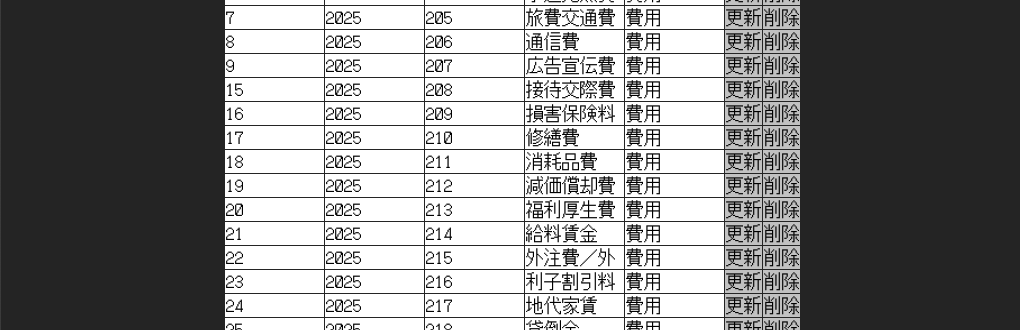
勘定科目コード表ができました。勘定科目は「図解 いちばんやさしく丁寧に書いた青色申告の本 ’26年版」から作成しました。この本をベースに仕訳帳ライトの完成を目指します。その10ぐらいまでいきそう。
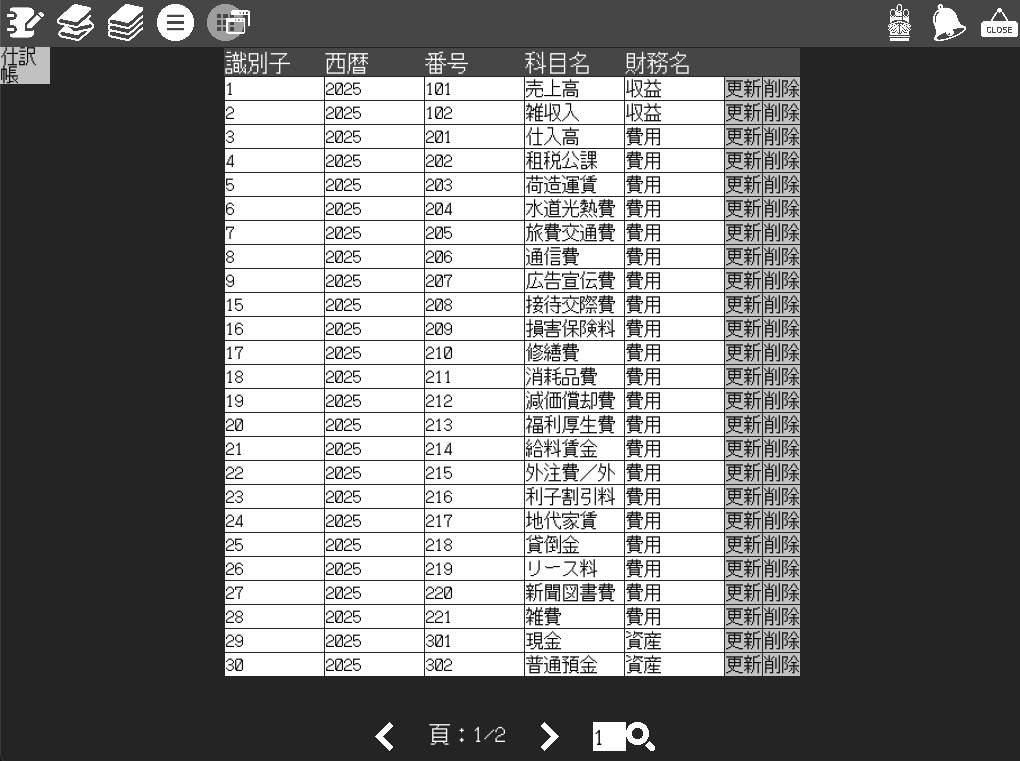
テーブル全般の機能を一通り作成しました。
新機能を色々追加したのでテーブル機能はこれで完成です。
次の機能を追加しました。
- テーブルのページング
- テーブルデータのフィルター機能
- フィルターリストの追加、削除
- ホバー時の注釈表示機能
フィルタリング時の絞り込み具合をわかりやすくするためにページング機能を作成しました。
ページング

前ページ「<」、後ページ「>」、虫眼鏡は指定したページに遷移します。頁:現在の頁/頁数を表示しています。
フィルター機能
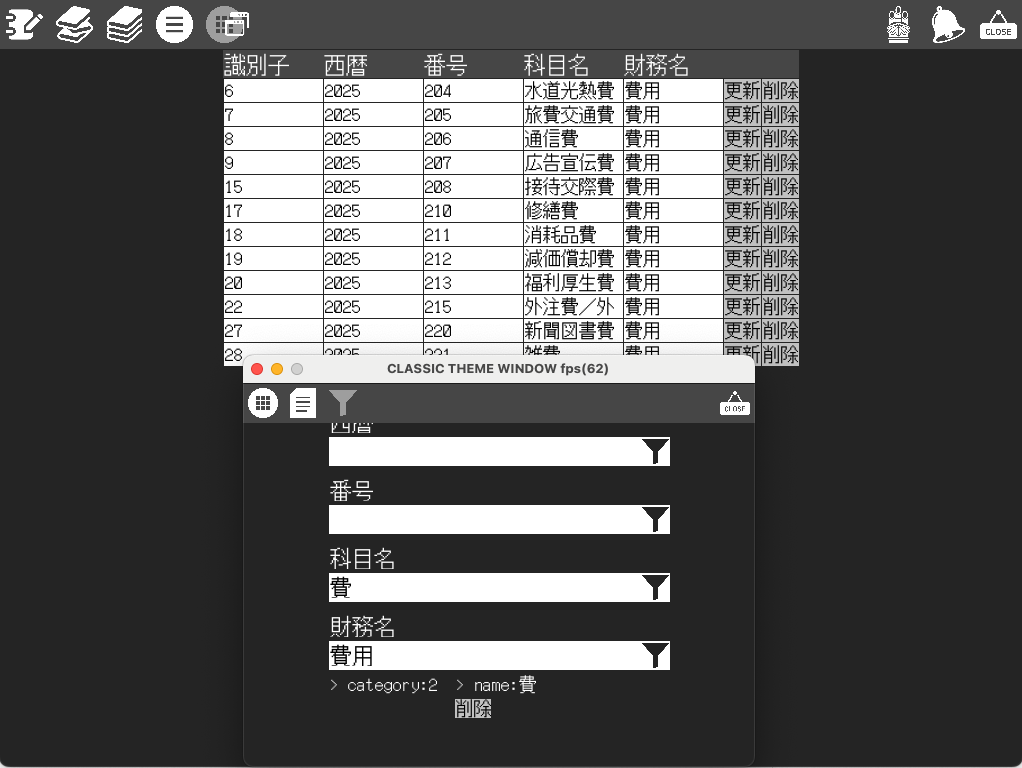
財務名:費用、科目名:”費”で抽出した結果です。別ウィンドウでメインページを操作する作りにしています。
フィルターリストの追加、削除

パンくずリストでフィルターを表示しています。クリックするとフィルタを削除します。
ホバーの注釈
画像グレー背景色で「仕訳帳」「次」「削除」という表示はマウスが操作要素の上にあると表示します。操作可能なところに注釈をつけました。
以上が機能の概要になります。
続いて、実装の思想について紹介します。
SQLで取得したデータをColumns=std::tuple<…>に格納します。json形式に変換とvalidationチェックも行います。account_itemフォーマットではid, year, code, name, category で勘定科目を扱います。Drogonサービス側ではこのデータフォーマットでRestApiを実行します。仕訳帳ライト側ではこのフォーマットでテーブルの作成、編集、追加を行います。
account_item_format.hpp
namespace spa::format {

  struct AccountItem
  {
    // id, year, code, name
    using Columns = typename std::tuple<unsigned int, unsigned int, unsigned int, std::string, unsigned int>;
    Columns record;
    unsigned int id;//識別子
    unsigned int year;//西暦
    unsigned int code;//番号
    std::string name;//科目名
    unsigned int category;//財務
    Json::Value json;

    AccountItem() : AccountItem(Columns{}) {}

    AccountItem(Columns record) : record{ record }
    {
      id = std::get<0>(record);
      year = std::get<1>(record);
      code = std::get<2>(record);
      name = std::get<3>(record);
      category = std::get<4>(record);

      json["id"] = id;
      json["year"] = year;
      json["code"] = code;
      json["name"] = name;
      json["category"] = category;
    }

    AccountItem(Json::Value json) : json{ json }
    {
      spa::utils::check::boolean(validate(json), __FILE__, __LINE__);

      id = json["id"].asUInt();
      year = json["year"].asUInt();
      code = json["code"].asUInt();
      name = json["name"].asString();
      category = json["category"].asUInt();
    }

    bool validate(unsigned int id, unsigned int year, unsigned int code, std::string name, unsigned int category)
    {
      return (category < static_cast<unsigned int>(FinancialCategory::OutOfRange));
    }

    bool validate(Json::Value json)
    {
      if ( !json.isMember("id")
        || !json.isMember("year")
        || !json.isMember("code")
        || !json.isMember("name")
        || !json.isMember("category"))
        return false;

      if ( !json["id"].isUInt()
        || !json["year"].isUInt()
        || !json["code"].isUInt()
        || !json["name"].isString()
        || !json["category"].isUInt())
        return false;

      return validate(
          json["id"].asUInt()
        , json["year"].asUInt()
        , json["code"].asUInt()
        , json["name"].asString()
        , json["category"].asUInt());
    }
  };

}accout_item_format.hppに追加でフォーマットリストを引数にフォーマットリストを返すフィルタ関数を定義します。文字列から削除操作が行えるように、std::pairを使って名称をつけています。
account_item_format.hpp
namespace spa::format::account_item::filter {

  using DATA = std::list<AccountItem>;
  using DecorationFc = std::function<DATA(DATA)>;
  using Specific = std::pair<std::string, DecorationFc>;

  Specific year(unsigned int year)
  {
    DecorationFc fc = [year=year](DATA data)
    {
      DATA data_;
      for (auto const& d : data)
      {
        if (d.year == year)
        {
          data_.push_back(d);
        }
      }
      return data_;
    };
    return Specific("year:" + std::to_string(year), fc);
  }

  Specific code(unsigned int code)
  {
    DecorationFc fc = [code=code](DATA data)
    {
      DATA data_;
      for (auto const& d : data)
      {
        if (d.code == code)
        {
          data_.push_back(d);
        }
      }
      return data_;
    };
    return Specific("code:" + std::to_string(code), fc);
  }

  Specific name(std::string name)
  {
    DecorationFc fc = [name=name](DATA data)
    {
      DATA data_;
      for (auto const& d : data)
        if (d.name.find(name) != std::string::npos)
        {
          data_.push_back(d);
        }
      return data_;
    };
    return Specific("name:" + name, fc);
  }

  Specific category(spa::format::FinancialCategory category)
  {
    DecorationFc fc = [category=category](DATA data)
    {
      DATA data_;
      for (auto const& d : data)
        if (d.category == static_cast<unsigned int>(category))
        {
          data_.push_back(d);
        }
      return data_;
    };
    return Specific("category:" + std::to_string(static_cast<unsigned int>(category)), fc);
  }

}
フィルタ関数を登録していくことで、絞り込みを登録順に実行しています。Format(Format(Format(data)))のようにフィルタリングをつなげていきます。
フィルタを削除したい場合はパンくずリストをクリックすると対象のフィルタを削除します。
メリットはデータ操作がformatクラスに集約されているためメンテナンス性が高いのとSQLからキャッシュした後、ネイティブプログラムの高速なデータ操作をユーザー側で実現できることだと思います。
コメントを残す